
What are active hours?
Within RingCentral, active hours (also called Work Schedule or My Work Day) is the time frame that calls will ring to your devices. By default, RingCentral accounts are set to a 24 hour work day, 7 days a week. This can be frustrating when your phone or laptop displays call notifications outside of your normal work day. A solution to this is to define your active hours.
How Do I Set Up Active Hours?
To setup active hours within RingCentral, follow these steps:
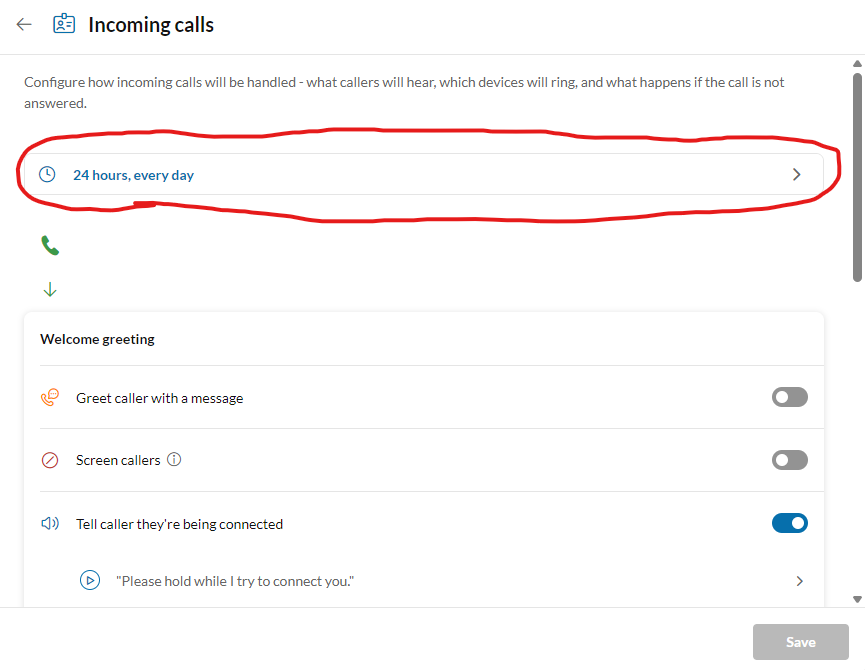
- Open the RingCentral app and navigate to Settings -> Phone -> Incoming Call Rules -> My Work Day -> Incoming Calls.
- Click the Clock Icon and select Add Schedule to define your active hours as shown below:
3. Select your standard work Days and Hours. All calls to your RingCentral Number and Extension will only be visible during these hours. Calls that fall outside of this range will automatically go to voicemail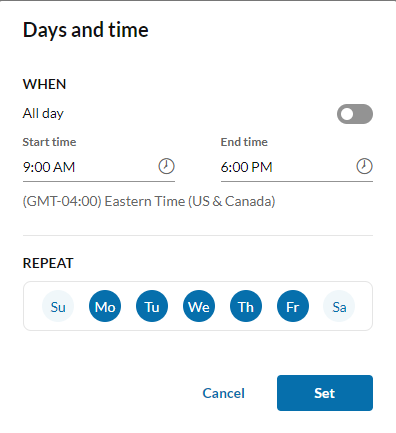
4. Press Set and then Save to apply this schedule.