
Whether it was a phishing test sent out by the I.T Department or a real life scam, everyone has received a phishing email in their life. Most of these do not make it past our email filtration and anti-spam controls but no technical solution can prevent all fraudulent emails from making it to your inbox. Therefore, it is important that we are watchful and think critically about the emails we receive and the links we click inside of them. The simple steps in this article will help you evaluate whether an email is trustworthy, teach you how to spot red flags, and explain what to do if you think an email is phishing.
Evaluating Email
- Ask “does this email pertain to me”? If the subject matter of the email is outside of your typical job responsibilities, it came from an unexpected source or at an unexpected time, proceed with caution.
- Pay attention to the sender’s email address. If the sender claims to be a Cummins employee, then their email address will always end with @cumminsbhs[.]org. In the example below, you can see that the sender address is ITDepartment@0365online[.]com which is not a Cummins address.
- If the email contains the following banner message… CAUTION: this email originated from outside your organization. Exercise caution when opening attachments or clicking links, especially from unknown senders…. This message is safeguard put in place by IT. If the sender claims to be from Cummins but their message has this banner, the email is fraudulent.
- Look out for red flags that may indicate a phishing scam such as urgent or threatening language, suspicious links – hover your cursor over the link before clicking. If the url is different from what the link says, or the url is very long and confusing, think twice about clicking. Poor grammar or spelling – these mistakes are common in scam emails. Requests for sensitive or financial information are also a red flag.
Lets take a look at an example from a recent phishing awareness campaign that was sent to our employees.
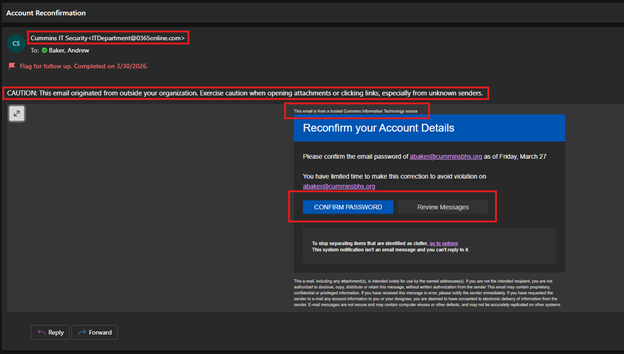
There are four red flags in this email:
- Illegitimate Cummins email address.
- Caution banner indicating the email came from an outside source.
- “This email is from a trusted Cummins Information Technology source”. This is deceiving and is meant to add legitimacy to the message
- Hovering over the links in the email reveals that they direct to a long and confusing URL

What to do if you receive a suspicious email
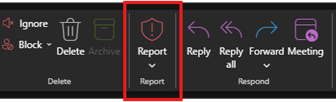
- Report it using the Report button in your outlook ribbon.
- Ask an IT staff member for guidance.
- Delete the email
DO NOT
- Click on any links or attachments
- Forward the message – Even if you are warning coworkers about it, it is still dangerous to spread the message to someone else who may click the link out of habit.
- Respond to the email - Engaging with a scammer invites further attacks.